
AI Automation Platform
01Project Overview
02The Challenge
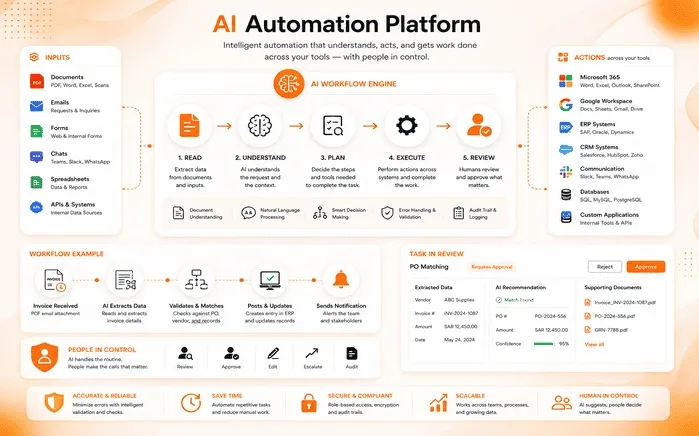
The team was growing, but so was the admin work behind every order, invoice, and customer request. Most of the day was going into work that didn't need judgment — only time. The gaps were clear:
- Hours lost daily to manual data entry and copying information between disconnected tools.
- Invoices, forms, and contracts processed by hand, slowing turnaround and inviting errors.
- Incoming email and tickets sorted manually, so urgent items sat in the queue behind routine ones.
- Older rule-based automations broke the moment a document arrived in an unexpected format.
- No single view of what ran, what failed, or what still needed a human.
- Handling more volume meant hiring more people rather than working smarter.
The opportunity was to automate the repetitive middle of the process — without handing over the decisions that carry real risk.
03Our Approach
We built the system around the work as it actually happens, not as a rigid flowchart:
- Mapped the highest-volume, lowest-judgment workflows first and automated those before anything else.
- Used AI to understand unstructured input — messy emails, scanned PDFs, and free-text forms — instead of brittle rules.
- Connected to the existing tool stack via APIs, so nothing had to be replaced or migrated.
- Added a confidence threshold: clear cases complete automatically, uncertain ones go to a review queue.
- Logged every step and decision so any outcome can be traced and explained.
- Shipped one workflow at a time, measuring time saved before moving to the next.
04Key Features
Document Understanding
Reads invoices, contracts, and forms — scanned or digital — and pulls out the fields that matter.
Email & Ticket Triage
Sorts, prioritizes, and routes every incoming message, and drafts a reply for routine requests.
Workflow Orchestration
Runs multi-step flows across apps with conditions, retries, and scheduling built in.
Human-in-the-Loop Review
Anything the AI isn't sure about lands in a review queue for a one-click approve or correct.
Integrations Hub
Connects CRM, accounting, helpdesk, storage, and chat tools through APIs and webhooks.
Analytics Dashboard
Shows volume handled, hours saved, accuracy, and anything that failed and needs attention.
05How It Works
Work enters from any channel, passes through the AI engine, and leaves as a completed action in a system of record — with a person stepping in only when confidence is low.
INTAKE                  AI ENGINE                      ACTION LAYER
 ┌───────────────┐      ┌─────────────────────────┐      ┌──────────────────┐
 │ Email inbox   │      │  1. Extract  OCR + parse│      │ CRM record       │
 │ PDF / Scan    │ ───▶ │  2. Classify intent     │ ───▶ │ Invoice / ledger │
 │ Web form      │      │  3. Validate rules      │      │ Helpdesk ticket  │
 │ API / Webhook │      │  4. Decide   confidence │      │ Notification     │
 └───────────────┘      └───────────┬─────────────┘      └──────────────────┘
                                    │
                    high confidence │ low confidence
                                    ▼
                        ┌───────────────────────┐
                        │ HUMAN REVIEW QUEUE    │
                        │ approve · correct     │  ──▶ feedback improves model
                        └───────────────────────┘

Every step is logged — full audit trail from input to final action.06Problems Solved
Invoice & document processing
Every invoice was opened, read, and re-typed into the accounting system by hand — slow at the best of times, and a source of quiet errors that surfaced weeks later.
The AI reads each document, extracts line items and totals, checks them against the purchase order, and posts the entry automatically. Mismatches go straight to review.
Inbox & request handling
Requests arrived in one shared inbox with no order to them, so urgent issues waited behind routine questions and follow-ups slipped.
Incoming messages are classified by type and urgency, assigned to the right owner, and answered with a drafted reply when the request is a familiar one.
Data sync across tools
The same customer details lived in several systems and were kept in step manually, so records drifted apart and reporting couldn't be trusted.
Scheduled and event-driven flows keep records aligned across systems, with conflict rules and retries so a single failure doesn't stall the chain.
07Built to Be Trusted
People Stay in Control
The AI handles the routine and hands over anything uncertain — automation with a person on the decisions that count.
Fully Auditable
Every extraction, decision, and action is logged, so any outcome can be traced back and explained.
Secure by Design
Role-based access, encrypted data, and controlled permissions for every connected system.
Improves With Use
Corrections made in the review queue feed back in, so accuracy climbs as the team keeps working.
08Results & Impact
09Conclusion
The AI Automation Platform shows what automation looks like when it's built around people rather than in place of them. By letting AI handle the repetitive middle of every process — reading, sorting, extracting, updating — and keeping humans on the judgment calls, VirtueNetz gave the team back its hours without giving up control. The result is a business that handles more work, more accurately, with the same people.
10Project Summary
| Project Name | AI Automation Platform |
| Role | AI Solution Design & Development (Workflow Automation) |
| Industry | Business Process Automation / AI |
| Audience | Operations, finance & customer support teams |
| Purpose | Automate repetitive document, inbox & data workflows with AI, keeping people in control |
| Technology | Python, FastAPI, LangChain, LLM APIs, PostgreSQL, Redis, Docker, React |
| Location | United States |
11Technologies Used
Have a manual process worth automating?
VirtueNetz designs and ships AI automation that fits the way your team already works — practical, auditable, and built to save real hours. virtuenetz.com · Live to Amaze
Start a Project
Let's Talk About
Your Software or AI Project
Tell us what you're building, and a senior engineer reviews it, not a template reading from a script.