| The mobile app development lifecycle is the structured sequence of phases a project moves through from initial concept to ongoing product management after launch. |
Most app projects do not fail because of bad code. They fail because the people making the decisions did not know what questions to ask, when to ask them, or what to expect at each step of the process.
This guide is written for you, the business owner, startup founder, product manager, or marketing leader who is preparing to invest in a mobile app but has not yet built one before.
This is not a technical manual. It is a planning guide. By the time you finish reading it, you will understand exactly what happens at each stage of a mobile app build, what it costs in time and money, and how to evaluate whether the development team in front of you actually knows what they are doing.
That clarity alone will save you weeks of confusion and thousands of dollars in avoidable course corrections. When evaluating a mobile app development partner, understanding these stages helps you ask the right questions from day one.
Why Understanding the Lifecycle Matters Before You Budget or Hire
The single most expensive mistake in mobile app development has nothing to do with code. It is signing a contract or setting a budget before you understand how a real project actually unfolds.
When you know the lifecycle, you can read a vendor proposal with informed eyes. You can spot a timeline that is missing an entire phase. You can ask the question that reveals whether a team does proper discovery or skips straight to design.
Lifecycle knowledge gives you the ability to:
- Evaluate vendor quotes and identify what is missing
- Set realistic milestone expectations and hold teams accountable
- Avoid scope creep by locking decisions at the right stage
- Understand why a project costs what it costs
- Know when to push back and when to trust the process
When you are evaluating a mobile app development partner, understanding these stages helps you ask the right questions from day one, rather than discovering critical gaps after the contract is signed.
Most App Projects Stall Because of Planning Gaps, Not Technical Ones
Product managers and development leads who have worked across dozens of app builds consistently point to the same failure patterns: discovery that was treated as a formality, requirements that were never clearly documented, and scope that expanded during the design phase without anyone adjusting the budget or timeline.
These are not technical problems. They are process problems, and they almost always trace back to the lifecycle not being followed properly.
When a vendor tells you they can skip wireframes to save time, or that discovery is just a couple of calls before they start designing, that is a red flag.
The lifecycle exists for a reason. Each phase builds on the last, and shortcuts in the early stages create compounding problems downstream.
What Lifecycle Clarity Gives You as a Business Decision Maker
Understanding the mobile app development process is not about becoming a developer. It is about having enough business intelligence to manage the relationship with your development team effectively.
You do not need to know how to write an API. You do need to know that API integration is a distinct phase with its own cost implications, and that it should appear somewhere in any serious project plan you receive.
Think of it this way: you do not need to know how to build a house to hire a contractor and hold them accountable. But you do need to know that plumbing and electrical work happen before drywall goes up. The lifecycle is your blueprint.
The Complete Mobile App Development Lifecycle: All Stages Explained
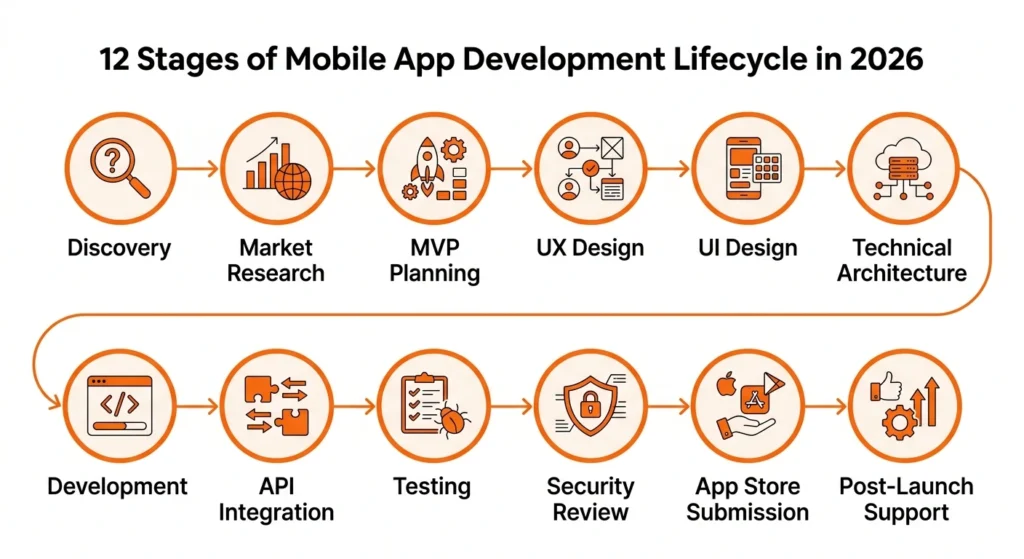
A well-run mobile app project moves through twelve distinct stages. Some overlap. Some run in parallel. All of them matter. Here is what actually happens at each one.
Stage 1: Discovery and Product Strategy
| Discovery is the phase where the project is defined, the problem is validated, and the business case is stress-tested before a single design decision is made. |
This is where you and your development partner sit down and align on what the app actually needs to accomplish, for whom, and why.
The deliverables from a good discovery phase include a clear problem statement, a competitive landscape review, a feature priority list, and a feasibility assessment.
The most common mistake here is treating discovery as a box to check. Teams rush through it to get to the exciting design work, and then spend months correcting misaligned assumptions that could have been resolved in a single well-facilitated session.
A good discovery takes one to three weeks depending on the complexity of what you are building. That investment almost always pays for itself.
This is also the stage where your MVP scope gets defined for the first time. What does version one need to do to validate the core premise? Everything else goes on the roadmap for later.
Stage 2: Market Research and User Definition
| Market and user research is the process of validating who your real user is, what they actually need, and what competing solutions already exist in the market. |
Most teams assume they already know their user. Most teams are partially wrong. The gap between ‘who we think will use this’ and ‘who actually needs this’ is where a lot of products get into trouble.
Validated user personas, built from real research rather than assumptions, directly reduce the cost of redesigns later because you are not building for the wrong person.
At this stage, the development team should be mapping your target user’s goals, frustrations, and behaviors, alongside an honest assessment of what competing apps already do well and where they fall short.
That competitive audit becomes the foundation for differentiation decisions in the design phase.
Stage 3: Feature Prioritization and MVP Planning
| Feature prioritization is the process of deciding which capabilities must exist in version one and which ones can wait, using a structured framework to make those decisions objectively. |
One of the most valuable things a good development team does is help you say no. The MoSCoW method, which categorizes features as Must Have, Should Have, Could Have, and Won’t Have, is a common framework for this conversation.
The goal is to lock a lean, coherent MVP scope that can be built, tested, and launched without requiring every feature you eventually want to include.
A minimum viable product is not a half-built app. It is a focused version of your app that solves the core problem well enough to generate real user feedback. Everything you learn from that first version informs what you build next.
Understanding what each stage costs matters enormously at this point, and the decisions you make here will directly shape the budget for every phase that follows.
Stage 4: UX Design and Wireframing
| UX design is the structural layer of your app, covering how users navigate, what they see first, and how they move through the product to accomplish their goals. |
Before any colors or visual branding are applied, a UX designer maps out the information architecture of the app. This includes user flows, screen layouts in low-fidelity wireframes, and navigation logic. Every major interaction gets mapped here before a single pixel of visual design is applied.
Skipping wireframes to save time is one of the most reliable ways to lose money on an app project. When you skip this phase and go straight to high-fidelity visual design, you inevitably discover structural problems that require tearing apart finished design work.
Fixing a flow issue in a wireframe takes an hour. Fixing the same issue after UI design is complete takes a day or more, and potentially longer if development has already started.
Stage 5: UI Design and Prototyping
| A mobile app prototype is a clickable simulation of the final product used to validate design decisions before development begins. |
With the UX structure locked, the UI designer brings the app to life visually. This phase covers the full design system: color palette, typography, icon style, component library, and every screen in the defined scope. The output is not just pretty screens, it is a clickable prototype that simulates how the real app will behave.
At this stage you should expect to review and provide feedback on the complete visual design before development begins. This is your last low-cost opportunity to make substantive changes. Modifications during development are significantly more expensive than modifications during design.
Designers follow Apple’s Human Interface Guidelines for iOS and Google’s Material Design guidelines for Android to ensure that the app meets platform standards and has a realistic chance of approval during submission.
Designers follow Apple’s Human Interface Guidelines for iOS and Google’s Material Design guidelines for Android to ensure the app meets platform standards.
Stage 6: Technical Architecture and Stack Decisions
| Technical architecture is the decision framework for how the app will be built, what technologies will power it, and how it will scale as the user base grows. |
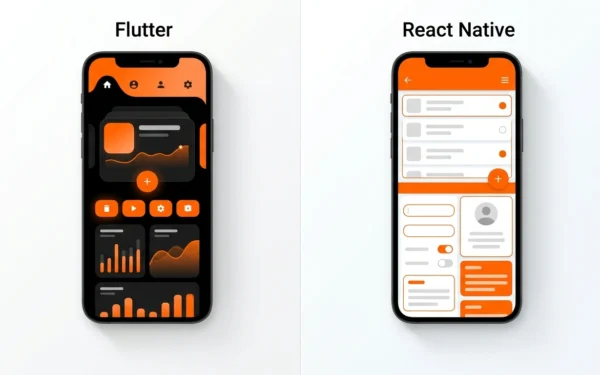
This phase is where engineers decide whether the app will be built natively for iOS and Android, or whether a cross-platform framework like React Native or Flutter will be used. The languages and frameworks your team selects at this stage will shape your options for years.
They also make decisions about the backend infrastructure, the database architecture, the hosting environment, and which third-party services will be integrated. A cross-platform approach built on React Native, for example, changes both your Stage 7 timeline and your long-term update costs.
These decisions are not just technical. They directly affect your budget, your timeline, and your future maintenance costs. The technology stack you choose here will shape your options for years. A poorly chosen architecture can make future feature additions significantly more expensive.
A well-chosen one makes iteration fast and affordable. The right choice for your project depends on your target platforms, your expected user volume, and the types of features you plan to build.
Stage 7: Frontend and Backend Development
| Development is the phase where the actual code is written, the app’s interface is built, and the server-side logic that powers it is created. |
This is the longest stage in the lifecycle for most projects. Work typically runs in two-week sprints, with regular demos so you can see progress and provide feedback on a working build rather than a static document.
Frontend development covers everything the user sees and interacts with: screens, animations, navigation, forms, and data display. Backend development covers the server, the database, and the logic that handles data processing, user authentication, and business rules.
The two must work together through a defined API contract, and one of the most common development problems occurs when frontend and backend teams build in isolation without clear agreements on how that interface will function.
If you are using a full-service agency, this coordination is handled internally. If you are managing separate contractors, it becomes your responsibility to ensure they are communicating effectively.
Stage 8: API Development and Third-Party Integrations
| Third-party integrations are the connections between your app and external services, including payment processors, analytics platforms, notification systems, and business tools. |
Almost every modern app connects to services it did not build itself. Payment gateways, push notification providers, analytics SDKs, CRM systems, mapping services, authentication providers, and ERP connections are all common integrations that require dedicated development work.
Integrations are frequently underestimated in project planning. Each one requires research, implementation, testing, and error handling.
A payment integration alone, done properly with test mode, production mode, webhook handling, and failure states, can take a week or more. Teams that treat integrations as simple plug-ins consistently run into delays.
This is one of the top causes of project timelines slipping, and it should be explicitly scoped and budgeted before development begins.
Stage 9: Testing and Quality Assurance
| Quality assurance is the systematic process of finding and fixing problems before they reach your users, covering functionality, performance, security, and accessibility. |
QA is not a single event that happens at the end of development. It is a continuous process that runs alongside every development sprint.
The types of testing a properly run project includes are:
- Functional testing
- Regression testing
- Performance testing
- Device compatibility testing
- Accessibility testing
The most expensive QA mistake is discovering critical bugs only after the app has been submitted to the App Store.
Rejection resets your launch timeline by days or weeks. Internal testing environments, beta testing through TestFlight for iOS and Google Play’s internal track for Android, and a structured sign-off process before submission are what prevent that outcome.
Stage 10: Security Review and Compliance Checks
| A security review is the process of identifying and addressing vulnerabilities in your app before it handles real user data or financial transactions. |
If your app handles user accounts, personal data, health information, or payment details, a security review is not optional.
This phase covers a review against the OWASP Mobile Top 10, the industry-standard list of the most critical security risks in mobile applications, along with data privacy compliance checks relevant to your markets, including GDPR for European users and CCPA for California users.
Penetration testing, where a security professional attempts to identify vulnerabilities by simulating how an attacker would approach the app, is increasingly standard for any app that handles sensitive data. The cost of a security review before launch is substantially lower than the cost of a breach after it.
Stage 11: App Store Submission and Deployment
| App store submission is the process of preparing and submitting your app to the Apple App Store and Google Play Store for review and public distribution. |
Submitting an app is not as simple as uploading a file. Both the Apple App Store and Google Play have submission requirements that cover metadata, screenshots, descriptions, privacy policy declarations, content ratings, and technical compliance with their respective platform guidelines.
Apple’s review process typically takes one to three days. Google Play is often faster. Both can result in rejection if requirements are not met.
Common rejection reasons include incomplete privacy disclosures, use of restricted APIs without proper justification, broken functionality during the review process, and metadata that does not accurately represent what the app does.
Building App Store review time into your launch plan, and having a clear protocol for handling rejections, prevents those final-week surprises that delay your launch date.
Stage 12: Post-Launch Support, Analytics, and Iteration
| Post-launch is the phase where you monitor how real users interact with your app, respond to issues, and use data to guide what you build next. |
 Launch is not the finish line. It is the starting line for a different kind of work. The first 90 days after launch are the most important period for understanding whether your product is working, where users are getting stuck, and what needs to change before the initial audience drifts away.
A well-structured post-launch plan includes crash monitoring through a tool like Firebase Crashlytics, user analytics to understand how people are actually navigating the app versus how you expected them to, a structured feedback collection mechanism, and a defined update cadence.
The teams that treat post-launch as a genuine phase, not an afterthought, retain more users and build better second versions because they are making decisions based on evidence rather than assumptions.
For broader context on managing an app product over time, a complete mobile app development guide covers the strategic layer that sits above individual release cycles.
Startup App Lifecycle vs. Enterprise App Lifecycle: Key Differences
The twelve stages described above apply to every mobile app project. What changes dramatically between a startup building their first product and an enterprise extending an existing system is how each stage is weighted, how long it takes, and who is involved.
How Startups Should Think About the Lifecycle
For a startup, speed of learning matters more than perfection of execution. The goal of the lifecycle is to reach a testable product as quickly as possible, get it in front of real users, and learn whether the core assumption is correct before spending the full budget. This shapes every stage.
Discovery is shorter but user research is arguably more critical, because a startup does not have an existing customer base to fall back on. The MVP scope should be aggressively constrained.
UX and UI design should be clean and functional but not overengineered. Security requirements are real but typically simpler than enterprise standards. The entire lifecycle from discovery to launch for a well-scoped startup MVP can reasonably be accomplished in three to six months.
Where startups most commonly over-invest is in features that are not essential to validating the core value proposition. Where they most commonly under-invest is in user research and post-launch analytics, the two things most likely to tell them whether they are building the right product.
How Enterprise Projects Change Every Phase
Enterprise app development looks fundamentally different. The scope is larger, the stakeholder list is longer, and the tolerance for ambiguity is lower. Security and compliance reviews expand from a single stage into an ongoing thread that runs through the entire project.
Every design decision may need to pass through multiple internal approval layers. Integration complexity is significantly higher because enterprise apps typically connect to legacy systems, internal APIs, and business tools that were never designed with mobile in mind.
QA and user acceptance testing in an enterprise context requires structured testing environments that mirror production, formal sign-off processes from business stakeholders, and often regulatory review before deployment.
The timeline for an enterprise app with moderate complexity typically runs nine to eighteen months. Treating it like a startup build is one of the most reliable ways to create a failed project.
| Lifecycle Factor | Startup / MVP | Enterprise |
| Discovery length | 1 to 2 weeks, focused | 3 to 6 weeks, broad stakeholder input |
| MVP scope | Aggressively constrained | Full feature set often required from day one |
| UX/UI process | Lean, 1 to 2 rounds of review | Multiple review cycles, brand standards |
| Security requirements | Standard best practices | Formal security review, pen testing, compliance |
| Integration complexity | 1 to 3 third-party services | Legacy systems, internal APIs, ERP/CRM |
| QA process | Continuous testing, beta launch | Formal UAT, staged rollout, regulatory review |
| Typical timeline | 3 to 6 months | 9 to 18 months |
| Post-launch | Fast iteration based on user data | Governed update cycle, change management |
Realistic Mobile App Development Timelines in 2026
One of the most frequently asked and most poorly answered questions in app development is how long it takes. The honest answer is that it depends on what you are building. Here is a realistic breakdown by complexity tier.
Timeline by App Complexity
| Stage | Simple App | Mid-Complexity App | Complex / Enterprise App |
| Discovery and strategy | 1 week | 2 to 3 weeks | 4 to 6 weeks |
| Market and user research | 3 to 5 days | 1 to 2 weeks | 2 to 3 weeks |
| Feature prioritization / MVP | 3 to 5 days | 1 week | 2 weeks |
| UX design / wireframing | 1 to 2 weeks | 2 to 3 weeks | 3 to 5 weeks |
| UI design / prototyping | 1 to 2 weeks | 3 to 4 weeks | 4 to 8 weeks |
| Technical architecture | 3 to 5 days | 1 to 2 weeks | 2 to 4 weeks |
| Frontend and backend development | 4 to 6 weeks | 8 to 14 weeks | 16 to 30 weeks |
| API and integrations | 1 to 2 weeks | 2 to 4 weeks | 4 to 10 weeks |
| Testing and QA | 1 to 2 weeks | 2 to 4 weeks | 4 to 8 weeks |
| Security review | 3 to 5 days | 1 to 2 weeks | 2 to 4 weeks |
| App store submission | 1 to 2 weeks | 1 to 2 weeks | 1 to 3 weeks |
| Total estimated range | 3 to 4 months | 5 to 8 months | 9 to 18 months |
Note: These ranges reflect typical industry patterns as of 2026 and should be verified against current agency benchmarks and the specific requirements of your project before being used for planning purposes.
What Causes Timelines to Slip (And How to Prevent It)
Most timeline overruns are predictable. The causes appear in the same order, on the same types of projects, repeatedly. Understanding them in advance is how you prevent them.
- Scope changes after development starts. Every new feature added mid-build displaces something else in the schedule. Lock scope before development begins and create a formal change request process for anything that comes up afterward.
- Client-side review delays. When the client takes two weeks to review a design deliverable that requires a three-day turnaround, the entire project timeline shifts. Establish review windows in your contract.
- Underestimated integration work. Third-party APIs are inconsistent in quality and documentation. Budget explicitly for integration complexity rather than treating it as a line item under development.
- QA issues discovered late in the cycle. Bugs found in the final week before launch are the most disruptive. Continuous QA throughout development, rather than a single round at the end, prevents the worst of these.
- App Store rejections. An Apple rejection during the final week of a project resets your launch timeline. Build submission lead time and a rejection protocol into your launch plan.
How Lifecycle Stages Connect to Budget and Hiring Decisions
Understanding where money gets spent in an app project is one of the most practically useful things this guide can give you. Budget overruns almost always happen because the client did not understand the cost profile of the lifecycle before the project started.
Where Budget Gets Consumed Stage by Stage
Different types of apps have very different cost profiles, and the lifecycle makes that visible.
Design-heavy apps, consumer products with sophisticated interfaces, front-load cost in Stages 4 and 5. You will spend a disproportionate share of your budget on UX and UI before development even begins, and that is correct if the product’s success depends on how good it feels to use.
Understanding what each stage costs in Texas before you commit to a development approach is one of the most important planning steps you can take.
Integration-heavy apps, business tools that connect to CRM systems, payment processors, and internal APIs, spike in cost at Stage 8.
Every integration is a project within the project. Teams that do not account for this explicitly consistently go over budget at this point. For Dallas-based projects specifically, app development cost structures vary depending on team size and delivery model.
Enterprise apps spend disproportionately on QA, security review, and compliance. For a consumer startup, these phases might represent 10 to 15 percent of the total budget. For a regulated enterprise product, they can represent 30 percent or more.
If you are in healthcare, finance, or any regulated industry, budget for this explicitly from the start.Understanding what each stage costs before you commit to a development approach is one of the most important planning steps you can take. The specific figures vary by team, region, and project scope.
When to Hire and What Roles You Actually Need
The roles you need change throughout the lifecycle. Hiring or contracting for the wrong roles at the wrong time is a budget drain.
- Discovery through MVP planning: You need a product strategist or business analyst. You do not yet need a developer.
- UX and UI stages: You need a UX designer and a UI designer. These are different skills and different people on serious projects.
- Technical architecture: You need a senior engineer or solutions architect. This is the highest-leverage technical decision in the project.
- Development: Frontend developers, backend developers, and if cross-platform, a specialist in React Native or Flutter.
- QA: A dedicated QA engineer. Testing done exclusively by the same people who built the feature has a known blind spot problem.
- Post-launch: A product manager or product owner, a data analyst, and ongoing development capacity for updates.
Understanding how to structure your development team well is its own discipline, and the role decisions you make here directly affect your lifecycle outcomes.
Working with a full-service development team compresses this complexity into a single managed relationship. Building a team from individual contractors gives you more control but requires you to manage the coordination that a full-service agency handles internally.
How to Evaluate a Vendor’s Lifecycle Process
When you are reviewing proposals from development teams, the lifecycle is your evaluation framework. Here is what to look for.
A solid discovery phase looks like a structured session with defined deliverables: a problem statement, a user definition, a feature priority list, and a feasibility assessment. If a vendor’s proposal moves straight from ‘scope call’ to ‘design begins,’ ask what happens between those two events.
Red flags to watch for: vendors who propose skipping wireframes to accelerate the timeline, teams whose proposals do not include QA as an explicitly defined phase, discovery sessions described as a single one-hour call, and proposals where integration work is listed as a single undifferentiated line item.
Questions worth asking before you sign:
- How do you handle scope changes once development has started?
- What does your QA process look like across the project, not just at the end?
- Who is responsible for App Store submission, and what happens if there is a rejection?
- What do you deliver at the end of each sprint?
Common Mistakes at Each Lifecycle Stage (And How to Avoid Them)
These are the real failure points, not the textbook ones. Each one has been observed repeatedly across real projects.
| Stage | Most Common Mistake | How to Avoid It |
| Discovery | Treating it as a formality instead of a foundation | Require defined deliverables: problem statement, feasibility check, feature list |
| User research | Skipping it because ‘we already know our customer’ | Commission at least five user interviews before design begins |
| Feature prioritization | Including everything in version one | Apply MoSCoW; ask ‘what happens if this feature is not in v1?’ |
| UX design | Skipping wireframes to save time | Never approve a design budget that does not include a wireframing phase |
| UI design | Approving designs without testing on real devices | Review all key screens on an actual phone, not just in a design tool |
| Technical architecture | Letting developers decide the stack without business input | Ask how the stack choice affects future update costs and third-party compatibility |
| Development | Frontend and backend teams not communicating API contracts | Require a documented API contract before development sprints begin |
| Integrations | Treating them as simple plug-ins | Require explicit integration scoping for every third-party service |
| QA | Running a single QA round at the end | Require QA sign-off after every sprint, not only at the end |
| Security | Skipping it to save money | Budget a security review for any app handling user data or payments |
| App Store submission | No contingency for rejection | Build two weeks of buffer into your launch plan for submission and review cycles |
| Post-launch | Treating launch as the finish line | Define a 90-day post-launch plan before the app launches |
A Pre-Launch and Post-Launch Checklist for Decision Makers
Use this checklist as a conversation tool with your development team. If any item cannot be checked off, it should not be assumed complete.
Before You Launch: 10 Things to Confirm
- UX has been tested with real users, not just reviewed internally
- All third-party integrations have been tested end-to-end in a production-equivalent environment
- App Store metadata, screenshots, descriptions, and preview videos are prepared and comply with current guidelines
- Crash monitoring and analytics tools are integrated, configured, and confirmed working
- A security review has been completed for any app handling user data, payments, or personal information
- Legal terms of service and privacy policy are in place and referenced correctly within the app
- A user support channel, email, in-app chat, or help center, is established and staffed
- A soft launch or closed beta plan has been executed and feedback has been reviewed
- App Store submission lead time has been built into the launch date, accounting for potential rejection cycles
- A marketing and user acquisition plan is ready to activate at launch, not still in progress
After You Launch: What the First 90 Days Should Include
- Weekly crash and error monitoring review using a tool such as Firebase Crashlytics
- User analytics review at 30, 60, and 90 days to understand real navigation patterns versus intended ones
- A structured mechanism for collecting qualitative user feedback, in-app prompts, support tickets, or direct outreach
- A planned first update cycle within 30 days to address early user feedback and any post-launch bugs
- Baseline establishment for retention, engagement, and conversion metrics so future changes can be measured
The first 90 days are where retention is won or lost. Apps that implement a structured post-launch review cycle consistently outperform those that treat launch as the end of the engagement.
For a broader strategic view of managing a mobile product over time, a complete 2026 mobile app development guide covers the strategic layer that sits above individual release cycles.
How to Choose the Right Development Approach for Your Lifecycle
One of the most consequential decisions in Stage 6 is the choice between native development and a cross-platform framework. This is not a purely technical decision. It affects your timeline, your budget, and your ongoing maintenance costs.
Native vs. Cross-Platform: How the Choice Affects Your Lifecycle
Native development means building separate codebases for iOS and Android. You get the best possible performance and access to the full range of platform-specific features, but you are essentially building two apps simultaneously, which increases cost and extends the development timeline.
Cross-platform frameworks like React Native and Flutter allow a single codebase to power both iOS and Android apps. This reduces development time and cost significantly for most project types.
The tradeoff is that highly complex animations, deep hardware integrations, and some platform-specific features require more workarounds than native development. For the majority of business apps, the tradeoff favors cross-platform.
The decision belongs in Stage 6, informed by the feature list locked in Stage 3. A project with extensive device hardware integrations or very high performance requirements may warrant native development.
A project with standard features and budget constraints almost always benefits from a cross-platform approach.
What Stack Decisions Mean for Post-Launch Maintenance
The technology stack you choose does not just affect how long it takes to build the app. It affects how much it costs to maintain and update it for years afterward.
A well-chosen cross-platform framework reduces the cost of adding features because changes propagate to both platforms simultaneously. A poorly chosen one can create technical debt that makes every future update more expensive than it should be.
Ask any team you are evaluating how their stack choice will affect update velocity in year two and year three. The answer to that question reveals a lot about how they think about the relationship between the build and the ongoing product.
For a broader strategic view of managing a mobile product over time, a complete 2026 mobile app development guide covers the layer that sits above individual release cycles.
Putting It All Together
The mobile app development lifecycle is not a technical framework. It is a business planning tool. When you understand what happens at each stage, what it costs, where projects typically break down, and how the decisions at each phase connect to the decisions at every other phase, you become a fundamentally better client, a better product owner, and a better decision maker.
A project that begins with strong discovery, follows a structured design process, separates integrations into their own scope, treats QA as continuous rather than terminal, and defines post-launch as a genuine phase is not just more likely to succeed. It is more likely to produce a product that users actually want to use.
If you are ready to move from lifecycle planning to evaluating the right development partner, the questions in this guide give you everything you need to assess whether a team actually runs a real process or just tells you what you want to hear.
Working with a Dallas-based mobile app development company that follows a structured lifecycle from discovery through post-launch support is where planning becomes product.
Frequently Asked Questions
What are the main stages of the mobile app development lifecycle?
Discovery, research, planning, UX/UI design, architecture, development, integrations, testing, security, deployment, and post-launch support.
How long does each stage of app development typically take in 2026?
Discovery and strategy takes 1–2 weeks, research and planning 1–2 weeks, UX/UI design 2–4 weeks, architecture 1 week, development 6–16 weeks, testing and security 2–4 weeks, deployment 1–2 weeks, and post-launch is ongoing.
What is the difference between an MVP and a full app development lifecycle?
An MVP runs the same lifecycle as a full app, just with a narrower scope — only the features needed to validate the core idea. A full app follows the same process but builds out everything.
How do lifecycle stages affect the total cost of building a mobile app?
Early-stage decisions drive total cost. Feature scope set in planning determines development cost, and architecture choices determine long-term maintenance cost. Skipping or rushing early stages almost always leads to cost overruns later
What happens after a mobile app is launched?
Post-launch covers crash monitoring, analytics, feedback, update planning, and retention tracking. The first 90 days are critical for understanding what’s working and what needs to change.
How does the development lifecycle differ for startups versus enterprise companies?
Startups compress the lifecycle to hit MVP in 3–6 months. Enterprise projects run 9–18 months due to more stakeholders, broader scope, stricter security, and formal testing processes. Scale and complexity affect every stage.
What are the most common reasons mobile app projects get delayed?
Delays usually come from mid-development scope changes, slow client reviews, underestimated integrations, late QA discoveries, and App Store rejections. All five are preventable with proper planning upfront.
What should business owners ask a development agency about their lifecycle process?
Ask about discovery deliverables, how scope changes are handled, whether QA is continuous or end-stage, who manages App Store submission and rejections, and how the stack choice affects year-two costs. The quality of answers reflects the quality of the team.
How do technology choices like React Native or Flutter affect the development lifecycle?
Cross-platform frameworks like React Native and Flutter cut development time and update costs by sharing one codebase across iOS and Android. Native development offers better performance for complex features but increases both build time and long-term maintenance.
What does post-launch app maintenance actually include?
Maintenance covers crash fixes, OS compatibility updates, performance optimization, new features from user feedback, security patches, and App Store updates. It is an ongoing operational cost, not a one-time expense.