
Why Your Team Is the Foundation of App Success
Building a successful mobile app starts long before the first line of code. It starts with the right team. If you’ve already explored our Mobile App Development Guide 2026, you know that planning and structure are everything. The team you assemble will directly determine whether your app launches on time, on budget, and actually works for your users.
In Texas and especially in Dallas the demand for qualified app developers has surged. Companies across industries like healthcare, fintech, logistics, and retail are racing to go mobile. But rushing into hiring without a clear team structure is one of the most expensive mistakes a business can make.
This guide walks you through every role you need, how to hire the right talent locally and remotely, what tools your team should master, and how to manage them for maximum output. Whether you’re a startup founder, a CTO at a mid-size company, or an enterprise decision-maker, this is the playbook you need.
| Pro Tip: According to Statista, the global mobile app market is projected to surpass $614 billion by 2026. Building the right team now puts you ahead of the curve |
Understanding Roles in a Mobile App Development Team
Every successful app development team has defined roles and clear responsibilities. Too many overlapping duties cause delays. Too few team members create bottlenecks. Here’s a breakdown of who you need and what they do.
1. Project Manager (PM)
The Project Manager keeps the entire operation on track. They bridge the gap between your business goals and the technical team. They plan sprints, manage timelines, track deliverables, and communicate with stakeholders.
For startups, one strong PM can handle everything. For enterprise projects, you may need a dedicated PM with a scrum master supporting them. Look for someone with PMP certification or proven agile experience in app development.
Key skills: Agile/Scrum, Jira or Asana proficiency, stakeholder communication, risk management.
2. UI/UX Designer
Your designer is not just making things look pretty. They are shaping how users experience your app. Bad UX is the number one reason apps get uninstalled. A skilled UI/UX designer creates wireframes, prototypes, and final visual designs that guide development.
For small apps, one designer can handle both UI and UX. Larger projects benefit from separate specialists, one focused on research and flow (UX) and another on visuals and design systems (UI).
Key skills: Figma, Adobe XD, user research, prototyping, accessibility standards.
3. Mobile App Developers (iOS, Android, Cross-Platform)
Developers are the engine of your project. Depending on your target audience, you’ll need iOS developers (Swift), Android developers (Kotlin), or cross-platform developers using React Native or Flutter. If you’re unsure which path to take, partnering with a trusted Mobile App Development Company in Dallas can help you evaluate the best approach for your budget and goals.
For startups on tight budgets, a cross-platform developer using React Native or Flutter can build for both iOS and Android simultaneously, saving significant time and money.
Mid-size and enterprise projects usually benefit from dedicated native developers for each platform, especially if performance and platform-specific features are a priority.
Key skills: Swift, Kotlin, React Native, Flutter, REST APIs, Git version control.
4. Backend Developers
Your mobile app is just the front door. The backend is where the real work happens — databases, APIs, authentication, push notifications, payments, and business logic all live here.
Backend developers build and maintain the server-side infrastructure that your app communicates with. Depending on complexity, you may need one or a team of backend engineers. Common stacks include Node.js, Python (Django/FastAPI), Ruby on Rails, or Java/Spring Boot.
Key skills: API design (REST/GraphQL), cloud platforms (AWS, GCP, Azure), databases (MySQL, PostgreSQL, MongoDB), security.
5. QA and Testing Engineers
Skipping QA is a shortcut that always costs more in the long run. QA engineers test the app for bugs, performance issues, security vulnerabilities, and usability problems before launch.
For startups, one QA engineer can cover manual and basic automated testing. Larger teams need dedicated automation engineers who write test scripts using tools like Appium, Selenium, or Detox.
Key skills: Manual and automated testing, Appium, Selenium, Detox, bug tracking tools like Jira, performance testing.
| Team Size Quick Reference: • Startup (MVP): 1 PM, 1 Designer, 1-2 Developers, 1 QA • Mid-size: 1 PM, 2 Designers, 3-5 Developers, 1-2 QA • Enterprise: 2+ PMs, 3+ Designers, 8-15+ Developers, 3+ QA + DevOps |
How to Hire the Right Talent in Dallas and Texas

Hiring the wrong developer is expensive. Studies from GoodFirms show that poor hiring decisions in tech projects can increase development costs by 25–40%. Here’s how to get it right from the start.
Local Hiring in Dallas vs. Remote Talent
Dallas has a thriving tech ecosystem. Areas like Uptown, Deep Ellum, and the Telecom Corridor are home to hundreds of tech companies. Hiring locally in Dallas offers easier collaboration, time zone alignment, and in-person standups when needed.
However, the local talent pool has limits and competition from major employers like AT&T, Match Group, and Texas Instruments is fierce. Remote hiring opens you up to top global talent, often at competitive rates, without sacrificing quality.
Best practice: Start with local Dallas talent for core leadership roles (PM, Lead Developer). Supplement with vetted remote specialists for specific skills.
Vetting and Interviewing Developers
A great resume doesn’t guarantee a great developer. Here’s a practical vetting process that works:
- Review their portfolio — real apps they’ve built and shipped, not just mockups
- Run a short technical assessment — a 2–4 hour paid task relevant to your project
- Check Clutch.co reviews if hiring through an agency
- Conduct a culture and communication interview — skills matter, but so does collaboration
- Ask for references from previous app projects, specifically clients they built for
For agencies and outsourced teams, always request a discovery call and ask to see client references from Dallas or Texas-based projects specifically.
Tools and Technologies Your Team Should Master in 2026
The tools your team uses determine how fast they move and how well they collaborate. Here’s what a modern app development team in Texas should have in their toolkit.
Project Management
- Jira industry standard for agile sprint planning and bug tracking
- Notion or Confluence documentation and knowledge base
- Slack team communication
- Zoom or Google Meet remote standups and client calls
Design Tools
- Figma collaborative UI/UX design, prototyping, and handoff
- Zeplin design-to-development handoff for pixel-perfect builds
- Lottie lightweight animations for mobile interfaces
Development and Version Control
- GitHub or GitLab version control and code review
- VS Code, Xcode, Android Studio primary IDEs
- Postman API testing and documentation
- Docker containerization for consistent dev environments
Programming Languages and Frameworks
Choosing the right language is a critical decision. We cover this in depth in our guide on the Best Mobile App Development Languages 2026. In short, Swift and Kotlin remain the gold standards for native iOS and Android, while Flutter and React Native lead the cross-platform space.
Testing Tools
- Appium automated cross-platform mobile testing
- Detox end-to-end testing for React Native apps
- Firebase Test Lab cloud-based device testing
- TestFlight (iOS) and Google Play Internal Testing (Android)
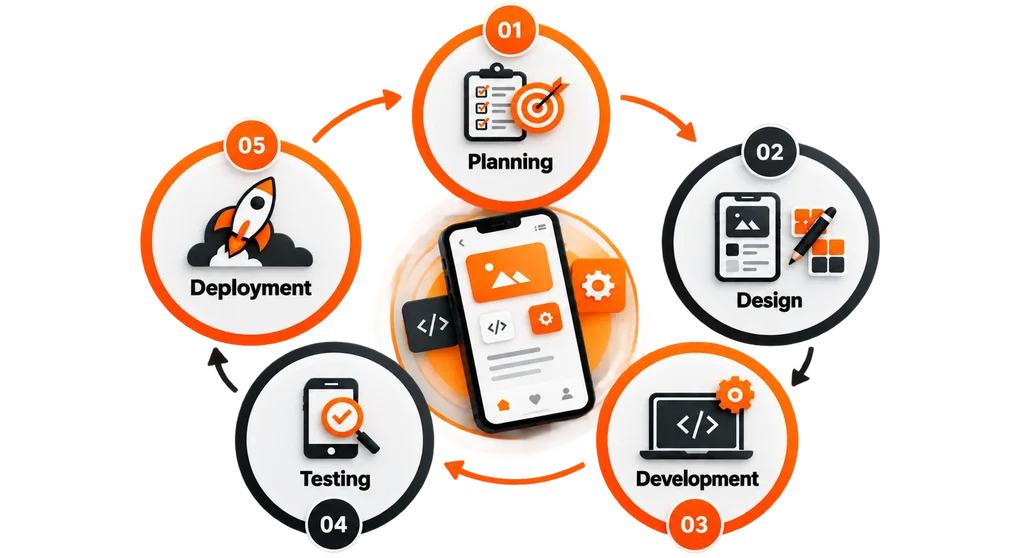
Managing Your Team for Maximum Productivity
Having great people on your team is only half the battle. How you manage them determines your output. Here are proven strategies that work for app development teams across Dallas and beyond.
Use Agile and Sprint-Based Workflows
Agile development is the industry standard for a reason. It delivers working software in short cycles (sprints), allows for rapid feedback, and reduces the risk of building the wrong thing for months before catching a mistake.
Run 2-week sprints with a sprint planning session at the start and a retrospective at the end. Daily standups (15 minutes max) keep the team aligned and surface blockers early.
Set Clear Communication Protocols
Define how and when your team communicates. Sync decisions through Slack or Teams. Document decisions in Notion or Confluence. Use Loom for async video updates when real-time meetings aren’t possible.
Establish a clear escalation path, who gets tagged when a blocker appears, who approves design changes, and who owns the final product decisions.
Track Progress with Real Metrics
Velocity: How many story points your team completes per sprint, helps with forecasting.
Bug Escape Rate: Percentage of bugs found after release vs. in QA, signals QA effectiveness.
Sprint Completion Rate: Percentage of committed stories completed each sprint, signals team health.
Review these metrics weekly. Use them to have honest conversations about pace, not to micromanage individuals.
Foster a Collaborative Culture
Remote and hybrid teams are common in Texas, especially post-2020. To maintain cohesion, run quarterly in-person team meetings (Dallas is a great hub for this), invest in async tools, and make sure every team member has a voice in retrospectives.
Common Challenges and How to Overcome Them
Challenge 1: Scope Creep
New feature requests keep appearing mid-development, pushing timelines out and budgets over. This is the number one killer of app projects.
Solution: Lock in a clear MVP scope before development starts. Use a formal change request process for anything added after kickoff. Every addition must be evaluated for impact on time and budget before approval.
Challenge 2: Communication Gaps Between Design and Development
Designers hand off beautiful screens. Developers build something that doesn’t quite match. Iteration eats time.
Solution: Use Figma with shared design tokens. Run design review sessions with developers before sprint start. Use Zeplin for precise handoffs with spacing, color codes, and component specs built in.
Challenge 3: Finding Experienced Talent in Texas
Senior mobile developers with real product experience are in high demand across Dallas, Austin, and Houston. Competition from large employers makes hiring challenging.
Solution: Start your search 60–90 days before you need the hire. Work with a vetted local agency as a bridge while building your internal team. Offer competitive equity or flexible work arrangements for senior talent.
Challenge 4: Maintaining Quality at Speed
Pressure to ship fast often leads to cutting corners on QA, which causes crashes, negative reviews, and costly hotfixes post-launch.
Solution: Bake QA into every sprint. Never defer testing to the end of the project. Automate regression tests early to protect against bugs being reintroduced as the codebase grows.
Final Thoughts and Next Steps
Building a mobile app development team is not a one-size-fits-all exercise. A solo founder launching an MVP needs a completely different structure than a Dallas-based enterprise rolling out a customer-facing platform.
What stays constant is this: clarity on roles, disciplined hiring, the right tools, and a culture of communication will determine whether your app project succeeds or stalls.
If you’re based in Texas and want to skip the trial-and-error, partnering with an experienced local development company can accelerate your timeline significantly. The right partner brings a proven team structure, tested workflows, and real-world experience shipping apps for Texas businesses.
| Ready to Build Your App Development Team in Dallas? Our team at VirtueNetz has helped businesses across Texas, from Dallas startups to Fort Worth enterprises, assemble and manage high-performing mobile app development teams. We handle the strategy, the team structure, and the execution. Contact us today for a free discovery call and let’s talk about what your project needs. |
→ Schedule Your Free Consultation with Our Dallas App Development Team
Frequently Asked Questions (FAQ)
The ideal team size depends on the project scope: 4–6 for MVPs, 8–12 for mid-size, and 15+ for enterprise apps.
Yes, many companies hire remote developers to access global talent and reduce costs, often using a hybrid model.
Building an in-house team takes 6–12 weeks, while agencies can provide ready teams in 1–2 weeks.
Key skills include cross-platform development, cloud technologies, API security, CI/CD, and AI integration, along with strong communication.